Every photo you post online contains hidden data that can reveal your exact location, device information, and personal habits - even if you think you've deleted it. This invisible threat, embedded in image files as EXIF metadata, has become a significant privacy and security concern in 2026 as artificial intelligence systems increasingly scrape online images for training data, and malicious actors exploit location information for stalking and identity theft.
Understanding what metadata reveals about you and learning how to remove it before sharing photos online is no longer optional - it's essential digital hygiene. This comprehensive guide explains the real-world privacy risks of photo metadata, which platforms automatically strip this data (and which don't), and provides step-by-step instructions for removing metadata from any device.

What is Image Metadata (EXIF Data)?
Image metadata, commonly referred to as EXIF (Exchangeable Image File Format) data, is a collection of information automatically embedded into digital photos by cameras and smartphones. This data serves as a digital fingerprint for each image, recording technical details about how, when, and where the photo was taken.
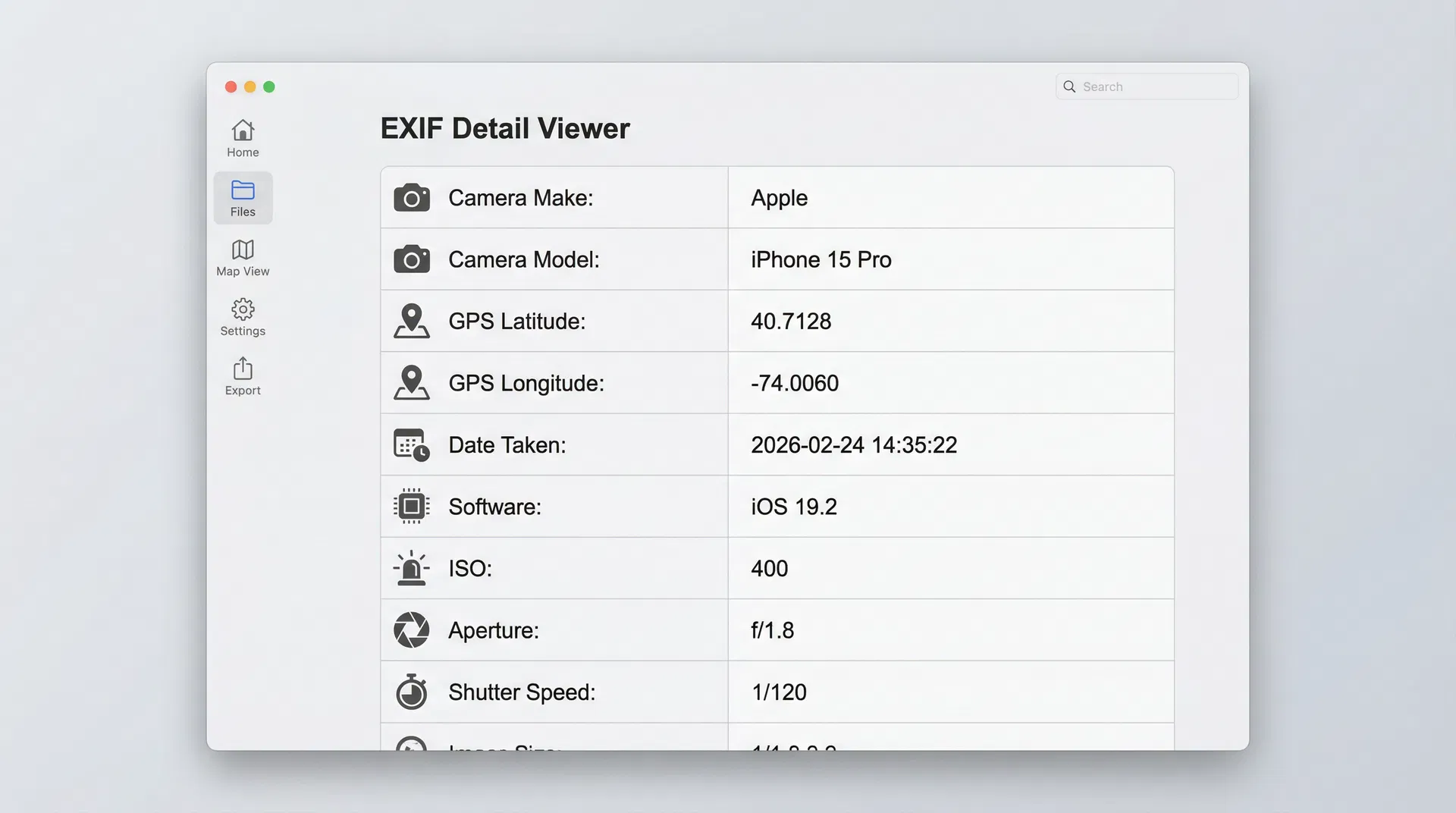
Modern smartphones and digital cameras store dozens of metadata fields in every photo, including camera make and model, lens specifications, exposure settings (ISO, aperture, shutter speed), software version, and most critically, GPS coordinates pinpointing the exact location where the photo was captured. Additional metadata types include IPTC (International Press Telecommunications Council) data used for copyright and authorship information, and XMP (Extensible Metadata Platform) data used by editing software like Adobe Photoshop and Lightroom.
While metadata serves legitimate purposes for photographers managing large image libraries and for law enforcement conducting forensic investigations, the same information becomes a privacy liability when shared publicly online. A single vacation photo posted to social media can inadvertently reveal your home address, daily routines, and device serial numbers to anyone with basic technical knowledge.
Real Privacy Risks of Photo Metadata in 2026
The privacy implications of photo metadata have escalated dramatically in recent years as both artificial intelligence capabilities and malicious actor sophistication have increased. What was once a theoretical concern has become a documented threat with real-world consequences.
Location Tracking and Stalking
GPS coordinates embedded in photo metadata represent the most immediate and dangerous privacy risk. Modern smartphones enable GPS tagging by default, meaning every photo you take with your phone's camera app records your exact latitude and longitude coordinates accurate to within a few meters. When you post these photos online without removing metadata, you're essentially publishing a map to your location.
Stalking cases involving EXIF data have increased significantly according to cybersecurity researchers. A 2025 study by the Electronic Frontier Foundation documented multiple incidents where domestic abusers tracked victims' locations through photos posted to social media, even when the victims had moved to undisclosed safe houses. In one documented case, a stalker extracted GPS coordinates from a seemingly innocent photo of a coffee cup posted to Instagram, revealing the victim's new workplace location.
The risk extends beyond intentional stalking to inadvertent home address exposure. Photos taken at your residence and shared online - whether of a new purchase, a pet, or a home improvement project - can reveal your home address to anyone who views the image file. Real estate professionals have reported incidents where burglars identified vacant homes by analyzing the metadata timestamps and GPS coordinates from vacation photos posted to social media, determining exactly when homeowners would be away.
Device Fingerprinting and Identity Theft
Beyond location data, metadata contains device-specific information that can be exploited for identity theft and account linking. Camera serial numbers, device model information, and software versions create a unique digital fingerprint that can be used to connect multiple online accounts to a single individual, even when those accounts use different usernames or pseudonyms.
Corporate espionage represents a growing concern in this category. Whistleblowers and journalists who attempt to share leaked documents anonymously can be identified through metadata analysis. The camera serial number and software version embedded in a photo of a document can reveal which specific device captured the image, potentially identifying the source. Several high-profile leak investigations in 2024 and 2025 successfully identified sources through metadata forensics, demonstrating the real-world consequences of metadata exposure.
Device fingerprinting also enables sophisticated phishing attacks. Cybercriminals can analyze publicly posted photos to determine what type of phone or camera you use, then craft targeted phishing messages that appear to come from that device manufacturer, increasing the likelihood you'll click malicious links or provide sensitive information.
AI Training Data and Deepfakes
A newer threat that has emerged prominently in 2026 involves artificial intelligence systems scraping online images along with their metadata for training purposes. Large language models and image generation systems now routinely harvest publicly available photos, and the metadata provides valuable context that improves AI training effectiveness.
The concern extends beyond simple data collection to the creation of increasingly sophisticated deepfakes. Facial recognition systems trained on photos with intact metadata can more accurately identify individuals and their typical locations, making it easier to create convincing fake images or videos of people in specific contexts. A joint statement published in February 2026 by 61 data protection authorities globally highlighted privacy issues in AI-generated imagery, specifically noting concerns about metadata exploitation in training datasets.
Timestamp patterns in metadata also reveal behavioral routines that AI systems can analyze to predict your schedule and habits. Photos consistently taken at the same location during specific time windows reveal your work schedule, gym routine, or regular social activities - information that could be exploited for social engineering attacks or physical security threats.
Workplace and Legal Implications
Professional contexts introduce additional metadata risks that can have serious legal and employment consequences. Journalists protecting confidential sources must ensure photos of documents or meetings contain no metadata that could identify the source's location or device. Failure to strip metadata before publication has resulted in source identification and prosecution in multiple documented cases.
Corporate employees face similar risks when sharing work-related photos. A photo of a whiteboard from a strategy meeting, if shared with metadata intact, could reveal the company's office location, the specific conference room, and the exact date and time of the meeting - information valuable to competitors or malicious actors. Several corporate espionage cases in 2025 involved metadata analysis of photos inadvertently shared by employees on professional networking sites.
Legal proceedings increasingly involve metadata forensics. Photos submitted as evidence in court cases are routinely analyzed for metadata authenticity, and discrepancies between claimed photo dates and actual EXIF timestamps have resulted in perjury charges. Understanding and controlling your photo metadata has become essential for anyone involved in legal matters.
Which Platforms Remove Metadata Automatically?
Not all online platforms handle photo metadata the same way. Understanding which services automatically strip EXIF data and which preserve it is crucial for protecting your privacy.
| Platform | Metadata Removal | Notes |
|---|---|---|
| ✅ Strips most EXIF data | Removes GPS and device info, preserves some camera settings | |
| ✅ Strips all EXIF data | Complete removal of metadata upon upload | |
| Twitter/X | ✅ Strips EXIF data | Removes metadata from uploaded images |
| ✅ Strips EXIF data | Metadata removed during image processing | |
| ⚠️ Partial removal | Removes GPS but may preserve other fields | |
| Slack | ❌ Preserves metadata | Only recently began stripping EXIF data in 2024 |
| Email (Gmail, Outlook) | ❌ Preserves metadata | Attachments retain full EXIF data |
| iMessage | ❌ Preserves metadata | Photos sent via iMessage keep all metadata |
| ✅ Strips EXIF data | Removes metadata from shared photos | |
| Signal | ✅ Strips EXIF data | Privacy-focused, removes all metadata |
| Telegram | ⚠️ Depends on send method | "Send as file" preserves metadata, "Send as photo" strips it |
The critical takeaway is that you cannot rely on platforms to protect your privacy. Email attachments, messaging apps, and file-sharing services frequently preserve complete metadata, and even platforms that claim to strip EXIF data may not remove all fields or may change their policies without notice. The only reliable protection is removing metadata yourself before uploading or sharing any photo.
How to Check if Your Photos Have Metadata
Before learning removal techniques, you should first understand how to view the metadata in your existing photos to see exactly what information is being exposed.
On Windows: Right-click any image file and select "Properties," then click the "Details" tab. This displays all available EXIF data including GPS coordinates (if present), camera information, and timestamps. Windows provides a basic viewer but may not display all metadata fields.
On Mac: Open any image in the Preview app, then go to Tools → Show Inspector (or press Command+I). Click the "i" icon and select the "EXIF" tab to view detailed metadata. Mac's Preview app provides comprehensive metadata viewing including GPS coordinates displayed as clickable map links.
On iPhone: Open the Photos app, select any image, swipe up to reveal details, then tap the "i" information icon. iOS displays limited metadata by default but shows location information if GPS tagging was enabled. For complete EXIF data viewing, you'll need a third-party app like Metapho or Exif Viewer.
On Android: The default Photos app provides limited metadata viewing. Open any photo, tap the three-dot menu, and select "Details" or "Info." For comprehensive EXIF data, install a dedicated metadata viewer app from the Google Play Store such as Photo Exif Editor or Metadata Viewer.
Using Online Tools: For a comprehensive view of all metadata fields, use our free metadata viewer tool which displays complete EXIF, IPTC, and XMP data in an organized, easy-to-read format. Simply upload your image (processing happens in your browser for privacy) and review all embedded information including GPS coordinates, camera settings, software details, and timestamps.
How to Remove Metadata from Photos (All Devices)
Once you understand what metadata your photos contain, the next step is removing it before sharing images online. Here are proven methods for every major platform and device.
Windows
Built-in Properties Method: Windows provides a simple built-in tool for metadata removal. Right-click any image file, select "Properties," navigate to the "Details" tab, and click "Remove Properties and Personal Information" at the bottom. You can choose to create a copy with all metadata removed or remove specific properties from the original file. This method works well for individual images but becomes tedious for batch processing.
Command-Line Method: For advanced users processing multiple files, Windows PowerShell offers batch metadata removal. Open PowerShell, navigate to your image folder, and run the command to strip EXIF data from all images in the directory. This approach is efficient for large photo collections but requires technical comfort with command-line tools.
Mac
Preview App Method: Mac's built-in Preview app offers the simplest metadata removal process. Open any image in Preview, go to Tools → Show Inspector (Command+I), click the "i" icon, select the "GPS" or "EXIF" tab, and delete the information you want to remove. Save the file to apply changes. Preview allows selective metadata removal, letting you keep camera settings while removing location data if desired.
Terminal Method: Mac power users can use the exiftool command-line utility for batch metadata removal. Install exiftool via Homebrew, then run commands to strip all EXIF data from images in a folder. This method is particularly useful for photographers processing hundreds of images before client delivery.
iPhone
Shortcuts App Method: iOS doesn't provide a built-in metadata removal tool, but the Shortcuts app offers a workaround. Create a custom shortcut that removes metadata from selected photos before sharing. Open the Shortcuts app, create a new shortcut, add the "Remove EXIF Data" action, and save. You can then run this shortcut on any photo before posting online.
Third-Party Apps: Several iOS apps specialize in metadata removal, including Metapho, Exif Viewer, and Photo Investigator. These apps provide user-friendly interfaces for viewing and removing EXIF data, with options for batch processing and selective field removal. Most offer free versions with basic functionality and paid upgrades for advanced features.
Android
Photo Metadata Remover Apps: Android's open ecosystem offers numerous metadata removal apps. Popular options include Photo Exif Editor, Scrambled Exif, and Metadata Remover. These apps typically provide simple interfaces where you select photos, choose which metadata fields to remove, and save cleaned versions. Many integrate directly with Android's share menu for convenient one-tap metadata stripping before posting to social media.
Google Photos Settings: While Google Photos doesn't remove metadata from original files, it strips EXIF data when you share photos through the app's built-in sharing feature. Use the "Share" button within Google Photos rather than downloading and manually uploading to ensure metadata removal.
Online Tools (Fastest Method)
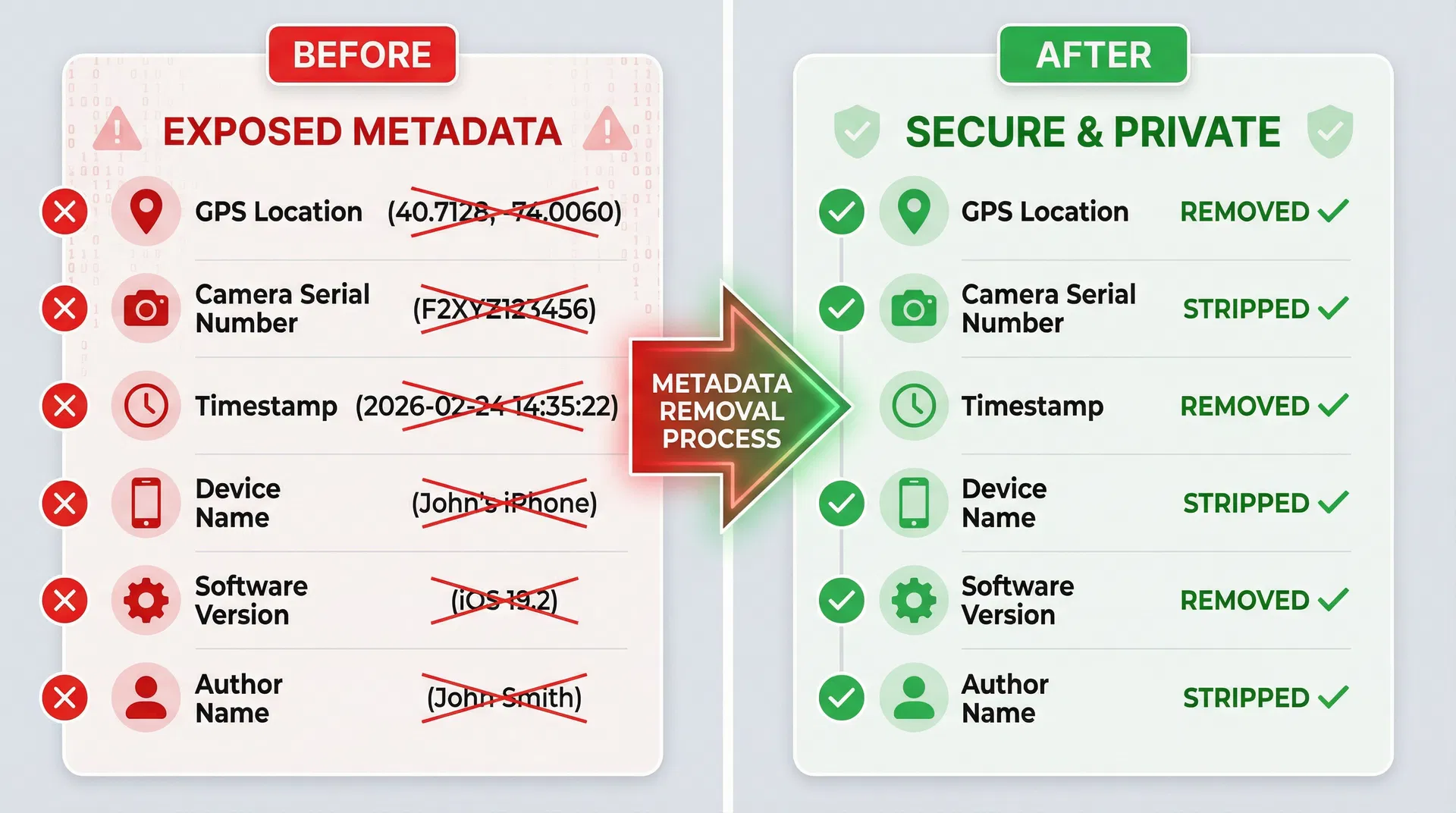
For the quickest and most convenient metadata removal across all devices, use our free metadata remover tool. This browser-based solution offers several advantages over device-specific methods. Upload your photos (processing happens entirely in your browser for privacy), and the tool automatically strips all EXIF, IPTC, and XMP metadata while preserving image quality.
The online approach works identically on Windows, Mac, iPhone, Android, and any device with a web browser. It supports batch processing for multiple images simultaneously, generates a privacy report showing exactly what metadata was removed, and requires no software installation or technical knowledge. For users who regularly share photos online, bookmarking a reliable metadata removal tool provides the fastest workflow.
Best Practices for Photo Privacy in 2026
Beyond removing metadata from individual photos, implementing comprehensive privacy practices ensures long-term protection of your personal information.
Disable GPS on Camera Apps: The most effective prevention strategy is stopping metadata creation at the source. On iPhone, go to Settings → Privacy → Location Services → Camera and select "Never" to disable GPS tagging for all photos. On Android, open your Camera app settings and disable "Save location" or "Geotag photos." This prevents GPS coordinates from being embedded in future photos while still allowing your maps and navigation apps to function normally.
Review Metadata Before Sharing: Develop a habit of checking photos for metadata before posting them online, especially when sharing images via email, messaging apps, or file-sharing services that don't automatically strip EXIF data. A quick review using a metadata viewer takes seconds and can prevent serious privacy breaches.
Use Privacy-Focused Platforms: When possible, choose communication platforms that prioritize privacy and automatically remove metadata. Signal and WhatsApp both strip EXIF data from shared photos, while traditional SMS/MMS and email preserve complete metadata. Understanding platform policies helps you make informed sharing decisions.
Screenshot Method (With Caveats): Taking a screenshot of a photo before sharing creates a new image file without the original's metadata. However, this approach has significant drawbacks including quality loss from compression, altered image dimensions, and potential creation of new metadata with your device information and current location. Use this method only as a last resort when proper metadata removal tools aren't available.
Watermarking for Copyright: Professional photographers and content creators should consider adding visible watermarks to images before sharing online. While watermarks don't remove metadata, they provide copyright protection and discourage unauthorized use. Combine watermarking with metadata removal for comprehensive protection, or use metadata to embed copyright information while removing privacy-sensitive fields like GPS coordinates.
Frequently Asked Questions
Does removing metadata reduce image quality?
No, removing EXIF metadata does not affect image quality in any way. Metadata is stored separately from the actual pixel data that makes up your image, so stripping this information leaves the visual content completely unchanged. The file size may decrease slightly (typically by a few kilobytes) due to the removed metadata, but this has no impact on resolution, color accuracy, or visual fidelity.
Can deleted metadata be recovered?
Once metadata is properly removed from an image file and the file is saved, the EXIF data cannot be recovered from that specific file. However, if you've previously shared the same photo with metadata intact, that earlier version still contains the information. Additionally, if you only removed metadata from a copy while keeping the original file, the original still contains complete EXIF data. Always ensure you're working with the version you intend to share and verify metadata removal before posting online.
Do professional photographers need metadata?
Professional photographers often rely on EXIF data for workflow management, client deliverables, and copyright protection. Camera settings embedded in metadata help photographers analyze their techniques and improve their craft. However, professional best practice involves selective metadata management - keeping EXIF data for personal archives and client proofs while removing privacy-sensitive fields like GPS coordinates before public sharing. Many professional photo management tools allow batch metadata editing to remove location data while preserving copyright and camera setting information.
What about video metadata?
Videos contain metadata similar to photos, including GPS coordinates, device information, and timestamps. Most video files use different metadata standards (such as XMP for video) but pose the same privacy risks. Video metadata removal requires specialized tools as the data is often embedded differently than in still images. Many of the same principles apply - disable location services when recording video, and use metadata removal tools designed for video files before sharing online.
Is metadata removal legal?
Removing metadata from your own photos is completely legal in all jurisdictions. You have full rights to control what information is embedded in images you create. However, removing metadata from photos you didn't create (such as images you downloaded from the internet) may violate copyright laws if the metadata contains copyright management information. Additionally, tampering with metadata in photos intended as legal evidence could constitute evidence tampering. Always remove metadata only from your own original photos or images you have explicit permission to modify.
Protect Your Privacy Today
Photo metadata represents a significant but often overlooked privacy vulnerability in our increasingly connected world. GPS coordinates, device information, and timestamps embedded in every image you capture can be exploited for stalking, identity theft, AI training, and corporate espionage. While some social media platforms automatically strip EXIF data, many communication channels preserve complete metadata, making manual removal essential for true privacy protection.
The solution is straightforward: develop a habit of removing metadata before sharing any photo online. Whether you use built-in operating system tools, dedicated apps, or convenient online services, taking a few seconds to strip EXIF data from your images provides substantial protection against real-world privacy threats. Combine metadata removal with smart practices like disabling GPS tagging on your camera app and choosing privacy-focused platforms to create comprehensive photo privacy protection.
Don't wait until your personal information is exposed - start protecting your privacy now. Try our free metadata remover tool to clean your photos in seconds, or use our metadata viewer to see exactly what information your images contain. For users who frequently share photos online, consider exploring our background removal tool and pricing plans for batch processing capabilities that streamline your privacy workflow.
This article was last updated in February 2026 to reflect current privacy threats, platform policies, and metadata removal techniques. As technology and privacy concerns evolve, we regularly update our guides to provide the most accurate and actionable information.